















Powered by UPI

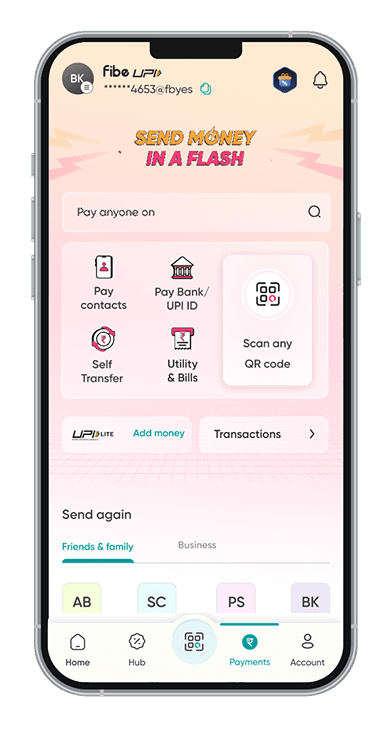
Fibe Pay, the everyday UPI app you need

From your morning chai to your monthly bills, make every payment & earn rewards along the way.

  • Scan & Pay Anywhere
  • Send & Receive Money
  • Earn Rewards on Everyday Spending
Get Started
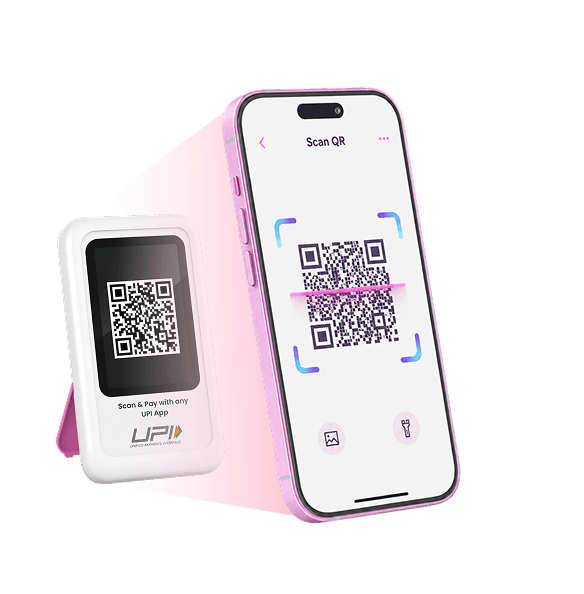
Fibe Pay UPI app with scan and pay QR code

Your Money Deserves Serious Security

Multiple layers of security work behind the scenes to help keep every Fibe Pay transaction protected

Groceries, Shopping, Commute, Bills - Everyday payments made simple

Morning chai. Grocery runs. Cab rides. Food orders. Utility bills. Fibe Pay makes the payments you make through the day simple and seamless.

Pay for groceries with Fibe Pay UPI

Your Spending Just Got More Rewarding

Pay eligible merchants with Fibe Pay and unlock cashback on every 5th eligible merchant transaction.

  1. 1st Payment
  2. 2nd
  3. 3rd
  4. 4th
  5. 5th Payment

More Payments. More Perks.

Qualifying to avail of the personal loan online from Fibe is pretty simple, thanks to our easy-to-meet eligibility criteria. Refer to the list to check your eligibility for a personal loan. If you match the eligibility criteria, you can then download

  • Home Expenses

    Fibe Coins

    Earn Fibe Coins as you make eligible transactions.

  • Medical Expenses

    Brand Vouchers

    Unlock exciting vouchers and offers from your favourite brands.

All Your
UPI Essentials, Together

From quick payments to recurring bills, find the UPI features you need in one place.

  • Scan & Pay
  • Receive Money
  • UPI Lite
  • Check Balance
  • Send Money
  • UPI Number
  • AutoPay
All Your UPI Essentials, Together

Ready to Make Fibe Pay Your UPI App?

Make payments, unlock rewards and get more from the transactions you already make.

Fibe pay FAQs

Fibe Pay is a fast, secure, and user-friendly UPI platform designed to simplify your payments and transfers. Experience seamless transactions with Fibe Pay today! 

Ensure your bank supports UPI. If it’s still missing, contact Fibe Pay support at support@fibe.in, and we’ll assist you promptly.

Download Fibe Pay, link your bank account, and choose a unique UPI ID (e.g., yourname@fibe). It’s that simple!

Fibe Pay offers instant transfers, top-notch security, and an intuitive interface. It’s your one-stop solution for all UPI needs, trusted by millions!

In Fibe Pay, select your bank account, enter your debit card details or OTP, and set a 4-6 digit UPI PIN securely.

Verify your mobile number is linked to the bank account. If the issue persists, reach out to our support team for help.

Go to ‘Manage UPI PIN’ in Fibe Pay, select your account, and reset it using your debit card or OTP.

Check your internet connection and ensure correct card/OTP details. If unsuccessful, contact your bank or Fibe Pay support.

Select the SIM linked to the mobile number registered with your bank account for seamless verification

Ensure your SIM is active and matches your bank-registered number. Retry or contact support@fibe.in.

In Fibe Pay, go to ‘Manage Banks,’ select your preferred account, and set it as default with a tap.

You get 3 attempts. After that, wait 24 hours or contact your bank to reset access.

Yes, but for security, we recommend using a unique PIN for Fibe Pay.

Open Fibe Pay, tap ‘Send Money,’ enter the recipient’s VPA or scan a QR, input the amount, and confirm with your UPI PIN.

Fibe Pay supports UPI, RuPay Credit Card, and bank transfers for versatile payment options.

The limit is ₹1,00,000 per day, per NPCI guidelines, ensuring secure and flexible transactions.

Ensure the VPA is correct and active. If the issue persists, the recipient’s bank may not support UPI lookup.

No, VPAs are fixed once created, but you can create a new one in Fibe Pay.

You can create up to 3 VPAs per account for added convenience.

Check camera permissions and QR code clarity. Restart Fibe Pay or update the app if needed.

Wait 24 hours; it may auto-reverse. If not, raise a complaint in Fibe Pay under ‘Transaction History.’

No, UPI transactions are instant and cannot be canceled once confirmed.

Contact the recipient or file a dispute via Fibe Pay’s ‘Help’ section. Refunds depend on their cooperation.

Yes, after a transaction, tap ‘Save Beneficiary’ in Fibe Pay for quick future payments.

Go to ‘Collect Requests’ in Fibe Pay to view and approve pending requests.

In ‘Collect Requests,’ select the suspicious request and tap ‘Block’ to report it.

Collect requests expire after 24 hours if not paid, per Fibe Pay settings.

You can pay merchants or individuals supporting RuPay Credit Card via Fibe Pay.

Verify your bank account is linked and has sufficient funds. Contact support if the issue persists.

Use ‘Send Money,’ enter your other account’s VPA or details, and confirm with your PIN.

No specific limit, but it’s subject to your bank’s UPI policies.

Not yet, but Fibe Pay is working on UPI International features—stay tuned!

Go to ‘Transaction History’ in Fibe Pay, select the transaction, and report it as fraud.

Contact Fibe Pay support at support@fibe.in with your details for quick resolution.

Check your internet, PIN, and bank server status. Retry or contact support if needed.

‘Pending’ means the transaction is processing. It should resolve within 24 hours or auto-reverse.

Request a refund from the recipient via Fibe Pay or file a dispute if they refuse.

Wait 24 hours for an auto-refund. If not credited, raise a compla int in Fibe Pay.

Check ‘UPI International’ in Fibe Pay settings and activate it once available with supported banks.

Major banks like SBI, HDFC, and ICICI support it. Check with your bank for eligibility.

Fees depend on your bank; Fibe Pay itself doesn’t charge extra for international use.

Limits vary by bank, typically up to ₹1,00,000 daily, subject to NPCI rules. 

Not currently, but Fibe Pay is exploring this feature for future updates

Tap ‘Check Balance’ in Fibe Pay, enter your UPI PIN, and view your account balance instantly.

Go to ‘Transaction History’ in Fibe Pay to see all your past payments and receipts.

A UPI Number is your VPA (e.g., yourname@fibe). You can’t change it, but you can create a new one.

In ‘Manage Payment Methods,’ select ‘RuPay Credit Card,’ enter details, and link it securely.

Check ‘Manage Banks’ in Fibe Pay; blocked accounts are listed under ‘Blocked Accounts.’

Go to ‘Manage UPI PIN,’ select your account, and reset using your debit card or OTP.

Yes, but for security, we suggest unique PINs for each account on Fibe Pay

UPI Blogs

Why is UPI ID not getting activated?
Payment

Why is UPI ID not getting activated?

UPI has made digital payments seamless, but sometimes there could be issues that users can face where their UPI ID not getting activated or verification fails. It can be related to connectivity or credentials mismatch or any other technical reason for that matter.  Let’s understand why this happens and how to fix it quickly in more detail.  Common Reasons for UPI Activation Failure  If your UPI ID not getting activated, it usually comes …

Read More 3 mins read

Fake UPI Payment : Scams & Prevention Methods
Payment

Fake UPI Payment : Scams & Prevention Methods

UPI has made payments effortless but it has also opened doors for scammers. According to IBTimes India, with over 27 lakh fraud cases worth ₹2,145 crore reported in recent years, the scale of the UPI scam problem is significant.  Let’s break down the most common techniques used in a fake UPI payment scam, so you know exactly what to watch out for.  1. Fake Payment Screenshots  One of the …

Read More 3 mins read
How to Block UPI Number?
Payment

How to Block UPI Number?

UPI is highly secure, but in situations like phone theft, suspicious requests, or fraud attempts, knowing how can I block my UPI ID becomes essential. Acting fast can prevent unauthorised transactions and safeguard your money.   If you’re wondering how to block UPI number, the quickest way is to contact your bank, disable UPI from your app settings, or block your SIM card if your …

Read More 3 mins read